AI integration

Run A/B tests from Claude, Cursor, and any AI agent: the Optibase MCP server

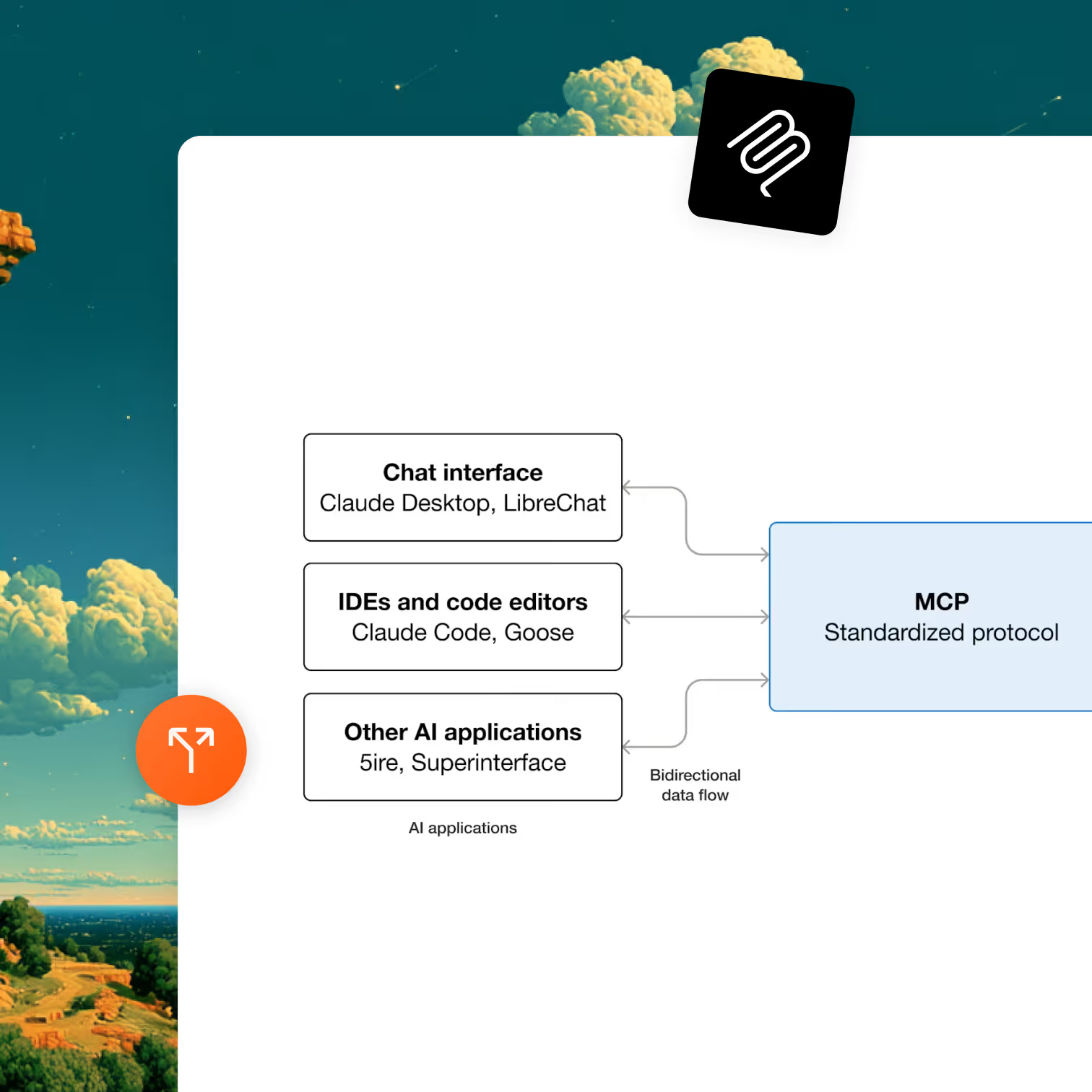
Optibase ships a hosted Model Context Protocol server at https://my.optibase.io/api/mcp. Add it to Claude Desktop, Cursor, or any MCP client, sign in once via OAuth, and ask the model anything about your A/B tests, heatmaps, traffic, or conversions.
Hosted, not self-installed. Add one URL to your MCP client config, no npx, no local server.
OAuth in the browser. Sign in once, pick your workspace, done.
Works in Claude Desktop, Cursor, and any MCP-compatible client.
Header image
Join 3000+ companies already testing with Optibase
About MCP

What is the Model Context Protocol?

Model Context Protocol is an open standard from Anthropic for connecting AI clients (like Claude Desktop and Cursor) to external tools and data sources. It is the cleanest way today to give an LLM the ability to do real work in your tools, instead of just answering questions about them.
Optibase shipped one of the first MCP servers in the experimentation category. If you spend your day in Claude or Cursor and want to ask questions about your A/B tests, traffic, heatmaps, or conversions without context-switching to another tab, this is how.
Why this integration

Why use the Optibase MCP server

Ask questions about your tests in natural language

Instead of clicking through Optibase to find which test is winning or losing, ask Claude. The model uses the MCP server to fetch live test data, conversion numbers, and audience breakdowns directly from your workspace, and answers in your conversation.
Performance and speed icon

Read heatmaps and recordings without leaving the agent

The MCP server exposes heatmap and audience data alongside test results. Ask Claude or Cursor "what's happening on my pricing page?" and the model can pull in heatmap signals, traffic mix, and current test status to give you a full read on the page.
No flicker icon

Glue Optibase into AI-driven workflows you build

If you build agentic workflows (auto-summarize tests, alert on significance, generate copy variants based on test data), the MCP server is the cleanest interface. Standard protocol, standard tooling, no custom HTTP wrappers.
Use cases

What you can do with the Optibase MCP server

Multiple testing options icon

Daily test status from Claude Desktop

Open Claude Desktop in the morning. Ask "what's the status of my active tests on Optibase?" The model pulls live data via the MCP server and tells you which tests are winning, losing, or still gathering data, with conversion numbers and confidence levels.
Conversion tracking icon

Page-level diagnostics in Cursor

You're editing your homepage in Cursor. Ask the model "what's the current heatmap and conversion picture for my homepage on Optibase?" It pulls heatmap signals, traffic by country and device, and conversion goals so you can make a data-aware change.

Auto-summarize a finished test

A test ends. Ask Claude to read the test results from Optibase and write a one-paragraph summary for your team Slack. The MCP server gives the model everything it needs (variants, conversion numbers, segments) and the output is shareable copy.
A/B testing icon

Generate copy variants for a new test based on previous winners

Ask Claude to look at your previous test history on Optibase, identify what kind of headlines have won before, and generate three new variant ideas for an upcoming test. The MCP server provides the historical data, the model provides the synthesis.
Setup

How to set up the Optibase MCP server

The Optibase MCP server is hosted. There is nothing to install locally. Add the URL to your MCP client config and sign in.

Open your MCP client config

For Claude Desktop: Open Settings → Developer → Edit Config. Add a new MCP server entry pointing to https://my.optibase.io/api/mcp.
For Cursor: Open Settings → MCP. Add a new server, type "HTTP", URL https://my.optibase.io/api/mcp.
For any other MCP client: Add the same URL using the client's standard MCP server configuration. The protocol is identical across clients.

Authenticate via OAuth

The first time the client connects, Optibase will prompt you to sign in via OAuth in your browser. Sign in to your Optibase account, pick the workspace you want the agent to access, and approve. The token is stored by your MCP client. You only do this once per workspace.

Ask your AI client a question

Open Claude Desktop or Cursor. Ask something like "list my active Optibase tests" or "what's the conversion rate on my pricing page test?". The client will use the MCP server to fetch live data from your workspace and answer.
Capabilities

What the Optibase MCP server exposes

Capability area

What you can ask

A/B test analysis

List active tests, get test status, compare variant performance

Conversion goals

Read conversion definitions, conversion volumes, and rates per test

Traffic and analytics

Pull traffic mix by country, device, browser, OS

Heatmaps

Retrieve heatmap data for any page in your workspace

Audience segmentation

Filter test results or analytics by audience segment

Strategic insights

Ask broader questions like "what should I test next?" backed by your data

Content retrieval

Pull page content for the model to suggest improvements against

Capability areaWhat you can ask
A/B test analysis List active tests, get test status, compare variant performance
Conversion goals Read conversion definitions, conversion volumes, and rates per test
Traffic and analytics Pull traffic mix by country, device, browser, OS
Heatmaps Retrieve heatmap data for any page in your workspace
Audience segmentation Filter test results or analytics by audience segment
Strategic insights Ask broader questions like "what should I test next?" backed by your data
Content retrieval Pull page content for the model to suggest improvements against

The exact MCP tool names and their schemas are returned by the server itself when an MCP client connects, so any MCP-compatible client will discover them automatically. No need to memorize tool names: ask in plain English and the client routes to the right tool.

Browse integrations

Optibase integrates with the rest of your stack

Google Analytics 4

The Google Optimize replacement. Variant exposure lands in GA4 as an event parameter, native or via GTM. Build variant-aware audiences for Google Ads remarketing.

Learn more

Mixpanel

Auto-detected. Variant exposure lands as a Mixpanel event with variantId and testId. Works in any Insight, Funnel, Retention, or Cohort.

Learn more

Amplitude

Variant assignment events flow into Amplitude. Skip the Amplitude Experiment seat. Analyze in your existing Amplitude dashboards.

Learn more

PostHog

PostHog Actions detect Optibase data attributes natively. Pair Optibase marketing-page testing with PostHog's product analytics.

Learn more

BigQuery

Service-account auth, batch export of variant assignments, conversions, visitor IDs, and timestamps. Joinable with the GA4 BigQuery export, Stripe revenue, and any other warehouse data.

Learn more

Stripe

Server-to-server attribution that survives Stripe Checkout's domain change. Pass the Optibase user ID via client_reference_id, fire conversions from your webhook, see revenue per variant on every test.

Learn more

Google Tag Manager

Trigger Optibase conversions from any GTM event with optibaseSendConversionEvent('your-conversion-id'). Push variant data into the dataLayer for every other tag to consume.

Learn more

Custom API

Active Variants API in the browser. Conversion endpoint for server-to-server events. External user IDs. Reverse-ETL flows.

Learn more
FAQ

Frequently asked questions about the Optibase MCP server

What is the Optibase MCP server?
It is a hosted Model Context Protocol server that lets AI clients like Claude Desktop and Cursor talk to your Optibase workspace. You add the URL https://my.optibase.io/api/mcp to your MCP client config, sign in via OAuth, and the model can then read your tests, conversions, traffic, heatmaps, and audience data, and act on them.
Which MCP clients does it work with?
It works with any MCP-compatible client, including Claude Desktop and Cursor explicitly. The protocol is the standard MCP spec, so any client that follows the spec will work.
Do I need to install anything locally?
No. The Optibase MCP server is hosted at https://my.optibase.io/api/mcp. There is no npx command, no local server, no binary to download. Just add the URL to your MCP client config.
How does authentication work?
OAuth via your browser. The first time the MCP client connects, Optibase prompts you to sign in and pick the workspace you want to authorize. After that, the client stores the token and connects without further prompts. No API keys to copy or manage.
Can I create or modify tests through Claude?
The MCP server exposes capabilities across A/B test analysis, traffic exploration, heatmap data, conversion tracking, and audience segmentation. The exact set of mutating actions (creating tests, editing variants) is what the server publishes when the MCP client connects. Ask the client to list available tools to see the current set.
 Is the source code open?
The MCP server is hosted by Optibase, not distributed as a self-installable package. The MCP protocol itself is open. If you need a self-hosted server for compliance reasons, contact Optibase support.
Is the MCP server available on every Optibase plan?
Yes. Every Optibase integration, including the MCP server, is available on every plan including the free tier. There is no upgrade or paid feature gate.